How it works
One installation per site, no infrastructure.
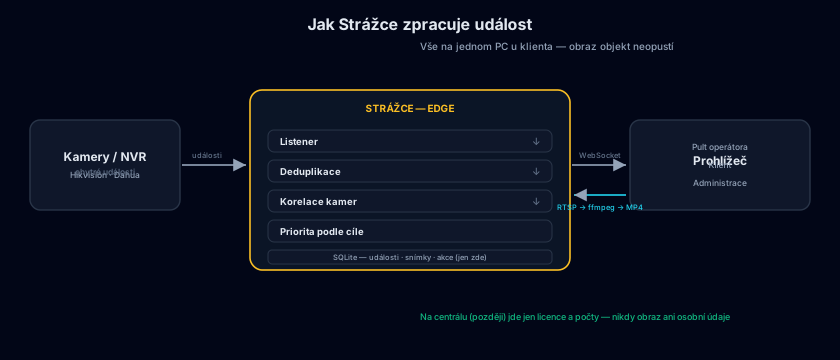
Strážce runs as a single process on a computer at the client's site. Classification is done by the cameras themselves — that's why an ordinary PC is enough and the system stays fast and cheap to operate.
Architecture in a nutshell
Cameras send smart events, Strážce cleans, merges and prioritises them, and the operator handles them in a browser. Recordings play back directly from the NVR — nothing is copied off-site.
What you need
| Computer | An ordinary Windows PC, or Linux (Debian) including the Raspberry Pi 4 — next to the NVR, no server or graphics card |
|---|---|
| Cameras | Hikvision and Dahua with smart detection (person / vehicle), standalone or via NVR |
| Network | The site's local network; internet is not required for operation |
| Operation | The Strážce app in its own window, or a web browser anywhere on the network |
| Language | Interface in Czech, English and Slovak — chosen during installation |
| Multiple sites | An optional central server: overview of all installations, licences and automatic updates |
Deployment in four steps
Installation
The installer sets Strážce up as a service — on Windows and on Linux. It starts with the system, runs in the background and needs no logged-in user.
Connecting cameras
Add cameras and NVRs in the admin interface — enter the address and credentials, and Strážce verifies the device's capabilities itself.
Setting priorities
Default priorities (person high, vehicle medium, animal low) can be adjusted to the nature of the site, per zone and per camera.
Operation
Operators log in to the console in their browser. Events arrive instantly and history is maintained automatically according to the configured retention.
Want to see Strážce in action?
We'll walk you through the operator console on real events and discuss deployment at your clients' sites.
Book a demo